 архив
архив
Установка Thinstuff LX Server
Hrafn
2009-03-25
Краткое вступление
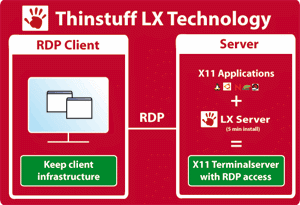
Стоит напомнить, что Thinstuff LX Server позволяет получить удаленный доступ к приложениям на основе X11 с помощью протокола Microsoft RDP (Remote Desktop). Что обеспечивает возможность использования как приложений Linux, так и Windows на одном рабочем столе — без необходимости вносить изменения в инфраструктуру.
Поскольку разговаривать мы будем о версии, предназначенной именно для машин с установленным Linux, то все последующие упоминания будут только об этой системе.
Домашняя страница продукта находится здесь
Подробно останавливаться на описании и возможностях продукта я сейчас не буду, с учетом того, что не так давно я вкратце описывал их (LX Server от Thinstuff).
Мне нравятся компании, которые дают возможность проверить работоспособность продукта, предлагая версии с ограничением подключений или с ограничениями по времени использования. Это дает возможность получить общее представление о работоспособности и пригодности для использования в конкретной организации и в конкретных условиях.
Компания Thinstuff также предоставляет такую возможность, чем мы и воспользуемся. Заодно скажу, что для Windows-версии существует 14-дневная триальная версия с полноценными возможностями, а для Linux — версия без ограничений по времени, но зато с ограничением количества подключений и сессий. Оба варианта доступны на этой странице. Подробней на возможностях оценочной Linux-версии я остановлюсь чуть позже.
На этой же странице можно посмотреть варианты предоставляемого продукта, а также стоимость лицензий на его использование, которая зависит от количества подключений.
Установка
Для начала необходимо получить дистрибутив LX Server.
Переходим в произвольную директорию по вашему выбору. У меня будет /tmp:
 cd /tmp
 wget http://www.thinstuff.com/releases/lxserver-1.2.1&minus5366.sh
Размер — примерно 60 мегабайт, поэтому потребуется какое-то время на скачивание.
--2009−03−16 16:37:59-- http://www.thinstuff.com/releases/lxserver-1.2.1&minus5366.shРаспознаётся www.thinstuff.com... 78.46.51.238
Устанавливается соединение с www.thinstuff.com|78.46.51.238|:80... соединение установлено.
Запрос HTTP послан, ожидается ответ... 200 OK
Длина: 62484766 (60M) [application/x-binary]
Сохраняется в каталог: `lxserver-1.2.1−5366.sh'.
100%[===============================================>] 62 484 766 115K/s в 7m 52s
2009−03−16 16:45:50 (129 KB/s) — `lxserver-1.2.1−5366.sh' сохранён [62484766/62484766]
Для установки необходимо получить права пользователя root. Установка под другим пользователем не поддерживается. Запускаем скрипт установщика:
  [root@off2>[root@off2  tmp]# bash lxserver-1.2.1−5366.sh
 checking archive integrity ...
 Thinstuff LX Server
 © Thinstuff s.r.o.
 http://www.thinstuff.com
 Welcome to the setup routine for the Thinstuff LX Server.
 This setup will install the RDP server on your computer in
 the directory /opt/thinstuff/rdpserver. The installation
 will take about 132 MB of harddisk space.
 For more information on non-interactive execution of this
 installer please use:
 lxserver-1.2.1−5366.sh --help
 Please press <enter> to continue
Здесь требуется нажать Enter для продолжения.
 detecting old installations ...
 Please choose one of the following actions:
 [I]nstall: This installs 1.2.1, build 5366.
 [E]xit:    Exit installer without changing anything.
 Please enter choice (E/I):
В данном случае, поскольку я уже ставил этот продукт, то установщик обнаружил ее. Сейчас нас интересует новая установка, поэтому выбираем I:
 Please enter choice (E/I): i
 Ready to begin installation. Please press <enter> to continue.
Установщик по любому поводу задаёт вопросы. Что-то мне это напоминает, но сейчас не об этом. Продолжим, нажав Enter.
 BY ANSWERING «Y» TO THE PROMPT AT THE END OF THIS TEXT, YOU ARE CONSENTING
 TO BE BOUND BY THIS AGREEMENT. IF YOU DO NOT AGREE TO ALL OF THE TERMS OF
 THIS AGREEMENT, ANSWER «N» TO THE PROMPT AT THE END OF THIS TEXT TO
 DISCONTINUE THE INSTALLATION. PLEASE PROMPTLY RETURN THE SOFTWARE PACKAGE
 TO Thinstuff s.r.o.
 THE FOLLOWING LICENSE GOVERNS YOUR RIGHTS TO THE THINSTUFF LX SERVER™
 SOFTWARE. YOU ARE NOT GRANTED ANY RIGHTS IN ANY SOFTWARE INCLUDED IN THIS
 SOFTWARE DISTRIBUTION THAT YOU HAVE NOT LICENSED AND FOR WHICH YOU HAVE NOT
 PAID THE APPROPRIATE LICENSE FEES TO Thinstuff s.r.o.
 1.  License.  The enclosed computer software and documentation («Software»)
 is not being sold and purchased, but is being licensed to you by
 Thinstuff s.r.o. («Thinstuff») under a personal, nonexclusive,
 nontransferable and paid-up license for use only under the following
 terms, and Thinstuff reserves any rights not expressly granted to you
 herein.  Under the terms of this license you own the media on which the
 Software is recorded, but Thinstuff retains all of the rights of
 ownership to the Software and all copies of the Software.  This license
 shall be governed by the laws of the Republic of Austria.
 2.  Under this license you may:
 a.) Make copies of the Software solely for backup or archival purposes.
 b.) Make simultaneous use of the Software on a number of computers up
 to the number of licenses you purchased for the software.
 c.) Transfer your rights under this license for the Software, provided
 that you give Thinstuff prior written notice of such transfer and
 --Далее--
Предлагается прочитать лицензию на использование. И принять ее:
Do you accept the license (yes/no) ? Yes
Далее будет предложено отправить производителю анонимную информацию о платформе, на которой будет использоваться данный продукт. Эта информация включает в себя тип процессора, версию ядра и другие подобные данные, собранные во время установки. Это опционально, можно отказаться, потому нажмем No.
 We would like to collect anonymous information about
 the platforms where this product is installed. These
 informations would include CPU type, Kernel version
 and similar data and would be collected only once
 during this setup.
 This step is OPTIONAL. If you do not want to send any
 information, just answer no to the next question. If
 you agree, then the information that is about to be
 sent will be displayed before it is actually trans-
 mitted.
 Would you like to send anonymous system information (yes/no) ? No
И далее следует подготовка и извлечение из архива:
 preparing Archive ...
 extracting Archive ...
 WARNING: enabling «trust» authentication for local connections
 You can change this by editing pg_hba.conf or using the -A option the
 next time you run initdb.
 * CORBA already running -> skipping
 * Starting PostgreSQL: .Done
 * lighttpd is already running -> skipping
 Finished starting system services...
 FINISHED installing database
 starting server ...
 * Starting Configuration Server: .Done
 * Proxy Service is already running -> skipping
 * Application Launcher is already running -> skipping
 * Waiting for RDP server to complete startup:
 Finished starting terminalserver services — accepting connections to the 	terminalserver
 Configuring default session program. Please choose one of the following options:
 [G]nome
 [T]wm: Built-in simple windowmanager (default).
 Please enter choice (G/T):